LAB 001 / 00 · Introduction
Reading another app’s data through a ContentProvider.
This first MobileSec LabNotes exercise started with a question: is requiring a permission enough to protect a ContentProvider’s data? I used InsecureShop, an Android app built for vulnerability training, to explore it.
I inspected the APK in JADX, checked the provider’s permission, and built a separate Kotlin app to query it. After logging into InsecureShop, the PoC could read the stored username and password.
The experiment ran on an Android 17 emulator without root. This guide documents a training exercise, not a production pentest.
The detail that matters
The provider required com.read, but it was a normal permission. Another app could request it in its manifest. Having a permission in place did not provide the restriction these credentials needed.
LAB 001 / 01 · ContentProviders & permissions
What happens when the client queries the provider?
A ContentProvider is one way Android apps share data. The client makes a request through ContentResolver and receives a cursor containing the result.
The URI in this lab is content://com.insecureshop.provider/insecure. The authority, com.insecureshop.provider, identifies the provider; /insecure is the requested path.
Why didn’t com.read prevent access?
A normal permission is granted at installation when an app requests it. It does not need runtime approval or require both apps to have the same signing certificate. That is the key detail behind the client’s access in this exercise.
When reviewing a provider, also check exported, read and write permissions, and any path-specific rules. Those settings and the provider’s implementation determine which callers can access which data.
References: Android permissions and provider declarations.
LAB 001 / 02 · Setup
Prepare the target and the client.
You’ll need Android Studio, an emulator, and JADX. Install both apps in the same emulator profile.
- Get the training APK from the Optiv InsecureShop project.
- Install it on the emulator and check that it opens.
- Open the same APK in JADX.
- Create a separate Kotlin Android project for the PoC, using a different application ID.
This exercise used an Android 17 emulator without root. For your own run, record the APK version and hash too. They are missing from these lab notes and matter when comparing results across builds.
LAB 001 / 03 · JADX analysis
Start with the manifest, then follow the query.
Find the provider authority in AndroidManifest.xml. Before examining the returned data, work out how another app can reach the component.
- Locate
com.insecureshop.providerand check whether it is exported. - Identify the permission protecting reads, then find the declaration of
com.read. - Check protectionLevel. If it is omitted, the default is
normal. - Open the provider class and follow
query, including how it handles/insecure. - Trace where the returned values come from and how they relate to login.
The question is specific: can a separate app obtain the required permission and use it to read data that should remain inside InsecureShop?
LAB 001 / 04 · Kotlin PoC
Query it from a separate app.
The PoC uses contentResolver.query to access the InsecureShop URI. Its manifest needs to request com.read.
Add <uses-permission android:name="com.read" /> inside the manifest element. Install InsecureShop before the PoC. If the custom permission did not exist when the client was installed, reinstall the client.
// Educational reconstruction; not the original captured PoC.
// Add <uses-permission android:name="com.read" /> to the manifest.
val uri = android.net.Uri.parse("content://com.insecureshop.provider/insecure")
contentResolver.query(uri, null, null, null, null)?.use { cursor ->
    while (cursor.moveToNext()) {
        for (index in 0 until cursor.columnCount) {
            val name = cursor.getColumnName(index)
            val value = cursor.getString(index)
            // Display only inside the controlled lab UI; avoid logging credentials.
        }
    }
}
The snippet walks through the cursor’s rows and columns without assuming field names. In an Activity, connect the query to a button and show the result in a TextView. Run the query off the main thread, then update the screen on the UI thread.
Handle a null cursor, an empty result, and a permission error separately. They point to different problems.
LAB 001 / 05 · Reproduction & evidence
Log in, then run the PoC.
Use the InsecureShop training account: shopuser / !ns3csh0p.
- Open InsecureShop and log in with the lab account.
- Check that login succeeded.
- Open the PoC on the same emulator and query
content://com.insecureshop.provider/insecure. - Compare the returned username and password with the login values.
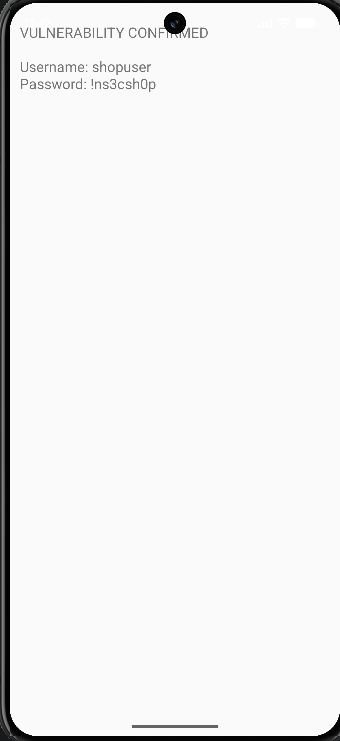
The result
The screenshot shows the PoC displaying shopuser and !ns3csh0p. That is the recorded result: another app could read the credentials through the provider.
The image is preserved as supplied. Android 17 and the absence of root come from the recorded environment; the screenshot alone cannot verify them. The Android experiment was not rerun while building this site.
LAB 001 / 06 · Troubleshooting
When the query doesn’t return what you expected.
Before changing the code, distinguish an access failure from missing data.
The ADB query returned a permission error
The ADB shell and the PoC are different callers. A shell failure does not mean an app requesting com.read will get the same result. Check the client manifest and reinstall the client if needed.
The username and password were empty
Check that InsecureShop accepted the login before you query it. Also check whether app data was cleared and whether both apps are in the same emulator profile. An empty field is different from a cursor with no rows.
The provider was not found, or the query threw SecurityException
Check the URI character by character, the target installation, and the permission requested by the PoC. Compare the installed APK build with the one you opened in JADX. If your code uses package discovery, review visibility rules separately from read authorization.
LAB 001 / 07 · Mitigations
What should change in the provider?
Start with one design question: does another app need this data at all?
If only InsecureShop uses the provider, explicitly set android:exported="false". If trusted apps signed with the same certificate need to share data, a signature permission can restrict access.
Review the response itself too. A general query should not return a username and password. Limit the fields, paths, and operations to what the intended workflow needs.
Check the fix
Repeat the query from the separate client and confirm that it no longer receives sensitive data. If there is an authorized client, check that its intended workflow still works.
These are proposed changes. This lab does not include a corrected build or a test result after remediation.